
This GeoPackage is made available under the CC-0 license.
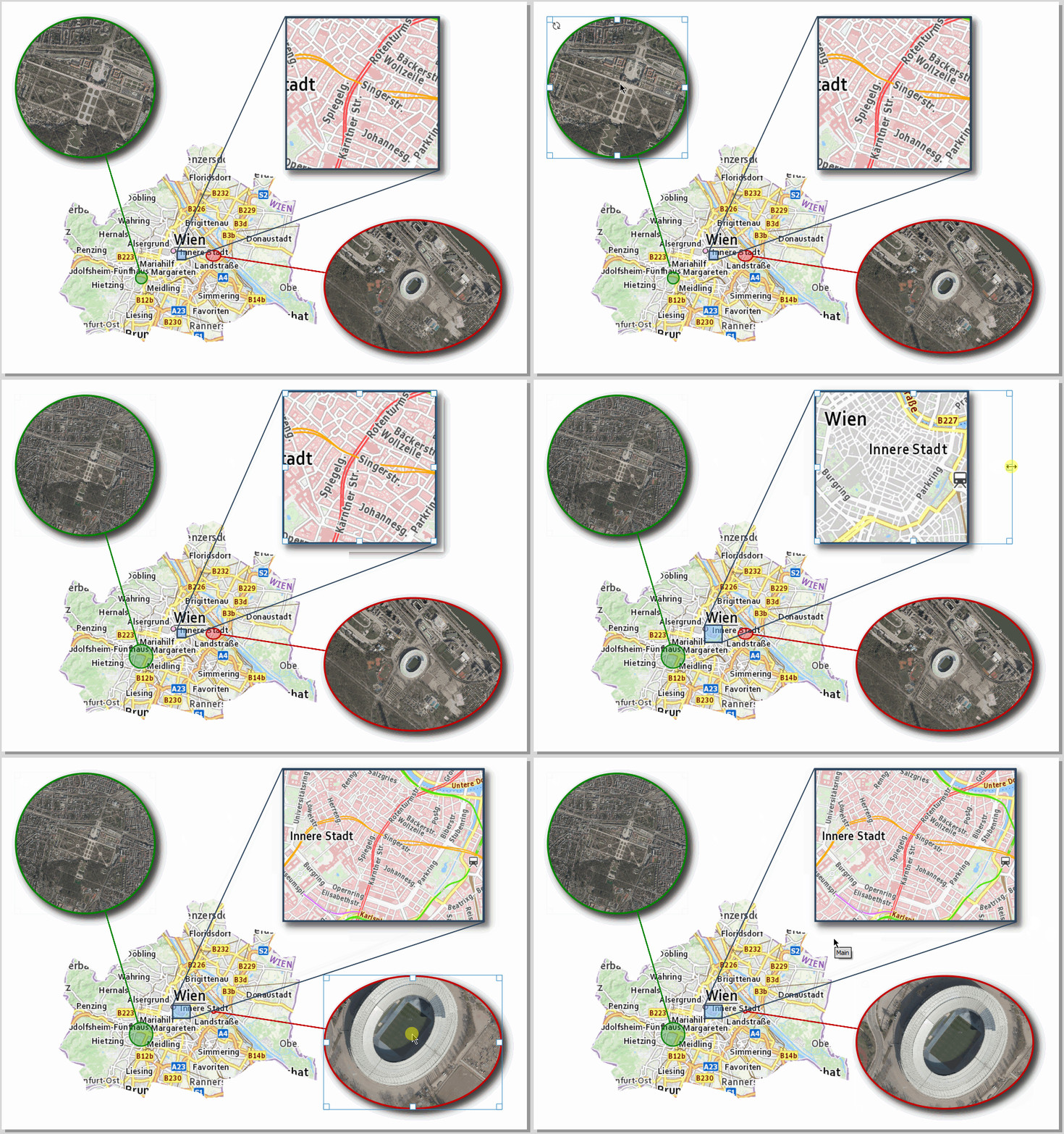
This sample project shows how Python expression functions can be used to create dynamic map overview guidelines. The Python macro stored in the project contains the expression function “showOverviewMapGuidelines.” It must be loaded when the project is started. The Python routine can also synchronize layout shape objects that are used to create shadow effects. To do this, the item ID of the shape objects must contain the ID of the corresponding map window and the suffix “_Shadow”. In addition to creating dynamic guidelines, the project also shows how to embed high-quality base maps using GDAL VRT. To do this, we use GDALWARP to create a VRT file, which we then drag and drop into the project.
gdalwarp -r near -of VRT --config GDALWARP_DENSIFY_CUTLINE NO -cutline_srs "EPSG:3857" -cutline "Polygon((1801649 6135190, 1803604 6132890, 1805904 6132085, 1804984 6131165, 1806249 6129210, 1806249 6127830, 1810964 6128635, 1814874 6127715, 1816139 6126680, 1817634 6129440, 1821888 6128520, 1825798 6127485, 1826718 6126680, 1829708 6126910, 1829593 6129900, 1831548 6130130, 1835228 6132890, 1838217 6133120, 1841437 6130ode>820, 1845577 6129670, 1845232 6133465, 1843162 6134040, 1842012 6136225, 1841207 6136570, 1841552 6138755, 1841092 6140135, 1842127 6143354, 1842702 6146804, 1841207 6147034, 1842012 6150829, 1839597 6150599, 1837412 6152669, 1838562 6154739, 1834883 6155429, 1834653 6152554, 1830168 6155314, 1829708 6159683, 1827983 6160488, 1825568 6159683, 1824648 6160258, 1823383 6159339, 1823843 6157269, 1823038 6156349, 1822578 6154049, 1820623 6154164, 1820048 6155429, 1817634 6153014, 1813494 6151864, 1813839 6151174, 1812459 6149794, 1810504 6149104, 1809469 6146689, 1808204 6146689, 1807859 6148184, 1804179 6150599, 1803144 6148644, 1802454 6146574, 1802914 6145309, 1802339 6144159, 1803029 6143239, 1804294 6141744, 1803489 6138525, 1801649 6135190))" -dstalpha "<GDAL_WMS><Service name='TMS'><ServerUrl>https://mapsneu.wien.gv.at/basemap/bmaphidpi/normal/google3857/${z}/${y}/${x}.jpg</ServerUrl></Service><DataWindow><UpperLeftX>-20037508.34</UpperLeftX><UpperLeftY>20037508.34</UpperLeftY><LowerRightX>20037508.34</LowerRightX><LowerRightY>-20037508.34</LowerRightY><TileLevel>15</TileLevel><TileCountX>1</TileCountX><TileCountY>1</TileCountY><YOrigin>top</YOrigin></DataWindow><Projection>EPSG:3857</Projection><BlockSizeX>512</BlockSizeX><BlockSizeY>512</BlockSizeY><BandsCount>3</BandsCount><UserAgent>QGIS</UserAgent></GDAL_WMS>" vienna.vrt
To embed the virtual raster in QGIS, we can use the QGIS plugin “changeDataSource” to replace the content of the VRT data source with the content of the VRT file.
When I open it, I see the lines, but they're in the wrong positions. If you'd like to analyze it in detail, you can contact me by email (I assume you should receive my address along with the review notification). In any case, the macro's functionality is interesting. I was also surprised by the use of the virtual raster to crop the main map; I hadn't seen that before. Thanks!
Reviewed by gabrieldeluca 4 months, 3 weeks ago
Thank you!
Reviewed by gabrieldeluca 4 months, 3 weeks ago
It works great. Thank you!
Reviewed by gabrieldeluca 4 months, 2 weeks ago

This GeoPackage is made available under the CC-0 license.

Flagship membership

Flagship membership

Large membership

Large membership

Large membership

Large membership

Large membership

Large membership

Large membership

Large membership

Large membership

Large membership

























